
Automatic job registration checks with Job-Room
Jobmaps detects registrable occupations, reports listings to Job-Room in one click and handles the five-day restricted period automatically.
At a glance
Jobmaps automatically checks new listings against the Swiss job registration requirement (activated per account)
Registrable jobs can be reported to Job-Room in one click
The five-day restricted period runs automatically, after which Jobmaps publishes the listing
Jobmaps takes the Swiss job registration requirement off employers' plates. Once the check is activated for an account, the platform detects at listing creation whether the occupation is subject to registration and, on request, reports the job directly to Job-Room, the job platform of the public employment service.
What is the Swiss job registration requirement?
The job registration requirement obliges employers in Switzerland to report vacant positions in occupations with high unemployment to the regional employment agency (RAV). Reported jobs are visible exclusively to registered job seekers for five working days and may only be advertised publicly afterwards. Reporting runs through Job-Room, the job platform of the Swiss labour market authorities.
The federal government defines the affected occupations every year. In practice this means: before publishing, employers check whether the occupation is on the list, report the job and wait before advertising. Jobmaps now handles exactly this process.
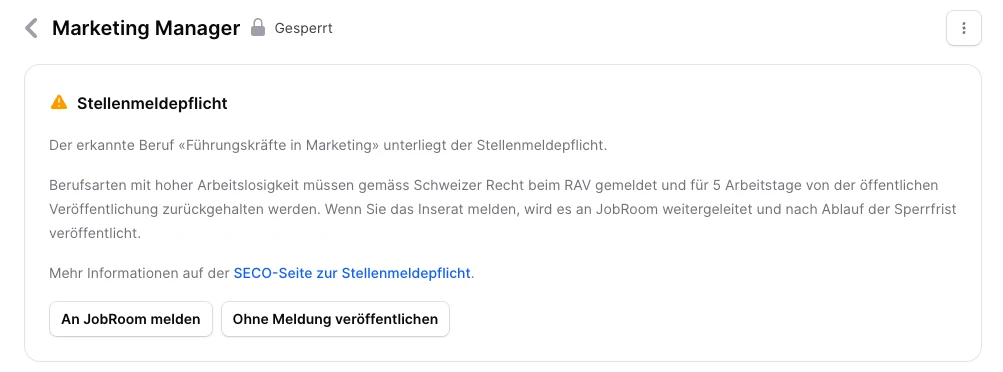
How does Jobmaps report a job to Job-Room?
With the check activated for the account, Jobmaps automatically matches the detected occupation against the registration list when a listing is created. If the occupation is registrable, a notice appears right on the listing: the job can be reported to Job-Room in one click, or published without reporting, for example if it has already been reported through another channel.
After reporting, Jobmaps handles the rest. The listing stays locked during the five-day restricted period, and applications are only possible through Job-Room during that time. Once the period ends, Job-Room releases the job and Jobmaps publishes the listing automatically. No manual follow-up needed.
How is the automatic check activated?
The automatic check is not on by default. It is activated per account by Jobmaps, a short message to the Jobmaps team is enough. From then on, the check runs for every new listing on the account. The decision whether to report a job stays with the employer for each listing.
The feature is particularly useful for companies hiring in occupations that regularly appear on the registration list, such as cleaning, hospitality, logistics or construction.
Frequently Asked Questions
Where do I see whether my listing is subject to registration?
Right when creating the listing, provided the check is activated for the account. Jobmaps matches the detected occupation against the registration list and shows a notice on the listing and in the listings overview if it applies.
Does the job have to be reported through Jobmaps?
No. The job can be reported to Job-Room in one click or published without reporting, for example if it has already been reported through another channel.
What happens during the restricted period?
The listing stays locked for five working days and is visible exclusively to registered job seekers. Applications are only possible through Job-Room during that time. Afterwards, Jobmaps publishes the listing automatically.
How is the automatic check activated?
The check is not on by default and is activated per account by Jobmaps. A short message to the Jobmaps team is enough, and it then runs for every new listing on the account.
You might also like
-
Manage application retention automatically
- Written by Jobmaps Schweiz
- Published on
-
Manage applications centrally with lifecycle tabs
- Written by Jobmaps Schweiz
- Published on
-
Find jobs by profession and location with topic pages
- Written by Jobmaps Schweiz
- Published on
-
Set minimum requirements and filter applications
- Written by Jobmaps Schweiz
- Published on
-
Choose your own rating system for applications
- Written by Jobmaps Schweiz
- Published on



